Fast and Reliable AI Workflows for AEC

From Data Fragmentation to Spatial Intelligence

Sid resolves construction data fragmentation and unreliability, and uses domain-grounded reasoning for more accurate AI workflows.

Book a demo

Make better decisions and unlock productivity with AI

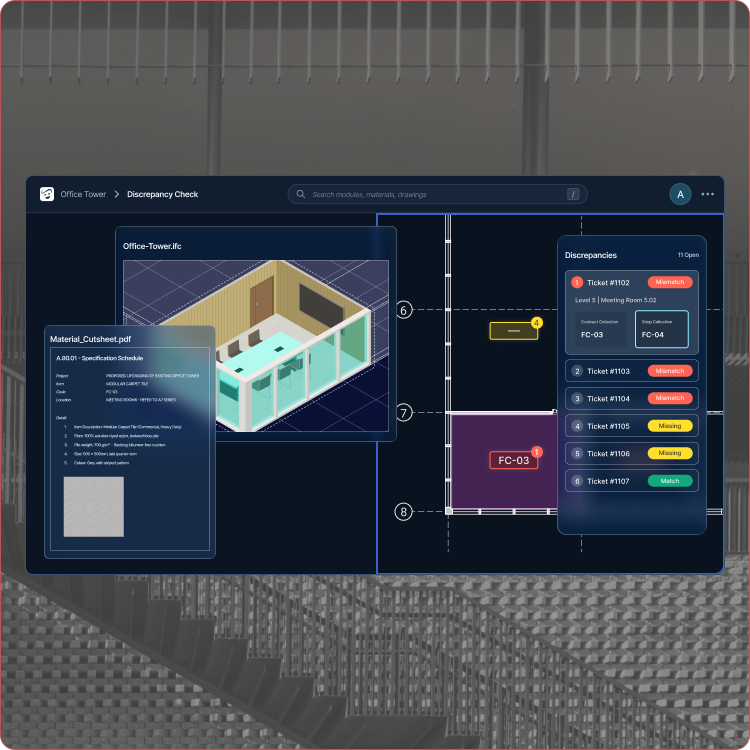
Reconcile multi-modal construction data
Sid checks for consistency between documents, drawings and models, automatically creating project norms from project material specifications, checking them across the documents and drawings for consistency.
Lorem ipsum dolor sit amet consectetur
Adipiscing elit sed do eiusmod tempor
Incididunt ut labore et dolore magna
Aliqua ut enim ad minim veniam quis
Nostrud exercitation ullamco laboris nisi
Aliquip ex ea commodo consequat duis
Aute irure dolor in reprehenderit voluptate
Manipulate construction data intuitively
Sid automatically creates project norms from project material specifications, checking them across the documents and drawings for consistency.
Ut enim ad minim veniam quis nostrud
Exercitation ullamco laboris nisi
User-friendly AEC workflows
Sid automatically creates project norms from project material specifications, checking them across the documents and drawings for consistency.

DocuMentor: Your Intelligent Project Brain

Execute automated audits across fragmented construction datasets. Resolve the information blackhole before it reaches site.

  • Revision compared against revision
  • Ask in words, get a table
  • Every answer cites its source file
  • Findings with an owner and a date
DocuMentor auditing a set of construction documents
https://www.youtube.com/embed/ScMzIvxBSi4
NimbleFaçade generating an ETTV report from a building model
https://www.youtube.com/embed/ScMzIvxBSi4

NimbleFaçade: Accelerate Facade Decarbonization

Seamless evaluation of façade performance from BIM model data

  • ETTV computed per orientation
  • Every facade module carries a value
  • One assembly library across studies
  • Output ready for submission

Domain-grounded workflows
Built by Architects and Engineers

Who it is for

Deliver better buildings faster

The same model, read five different ways. Each role gets the answer it is accountable for, from one source instead of five.
Architects
+ Check drawings against codes and your design standards automatically to ensure consistency

+ Run the first pass across submittals and shop drawings against design intent, catching discrepancies before they reach your desk

+ Instant search across all drawings and models without BIM software required
Contractors
+ Find discrepancies in project documents and prepare RFIs in minutes

+ Catch errors in shop drawings before they go to site

+ Analyse project information and validate quantities using natural language prompts

Engineers
+ Prepare building performance studies and authority submissions automatically
Trusted by leading industry players
Testimonials

“NimbleFacade delivered reliable ETTV submission data within a tight turnaround, helping our engineers stay on track.”

Er. Leslie Khuan
Director, DP Engineer
1
/
3
FAQ

Everything you need to know.

Which modules are available today?

Two modules are live today, and they share one index of your project data:

  1. NimbleFaçade, for ETTV reporting and envelope compliance.
  2. DocuMentor, for automated audits across document sets.
  3. Both read the files your team already produces.
  4. Further modules build on the same data layer.

You can start with one and add the other without re-indexing anything.

setup
How does Sid fit our existing BIM workflow?

Sid reads the model and document set you already produce. There is no migration:

  1. Point Sid at a collection and it indexes the files.
  2. It runs the audits you choose.
  3. Results trace back to the source document.
  4. Your data stays in your environment.

Nothing about how your team models or documents has to change.

workflow
How long does an ETTV submission take?

Work that used to take a fortnight of someone's time now runs in an afternoon:

  1. ETTV computed per orientation.
  2. Every facade module carries a value.
  3. One assembly library across studies.
  4. Output formatted ready for submission.

The time saved goes back into the design rather than the paperwork.

compliance
Who owns the project data?

You do. Sid processes your project data, it does not acquire it:

  1. Files stay inside your environment.
  2. Nothing is used to train shared models.
  3. Access follows your existing permissions.
  4. Results are exportable at any time.

If you stop using Sid, your data and your outputs remain yours.

data
How long does setup take?

Placeholder answer. Most teams are running their first audit inside a day, because Sid indexes the files where they already sit.

setup
Do we need to change how we model?

Placeholder answer. No. Sid reads the model and document set your team already produces.

workflow
Which codes does Sid check against?

Placeholder answer. Envelope compliance is computed to the code set for the project market.

compliance
Where is our data stored?

Placeholder answer. Inside your own environment. Sid processes your project data, it does not take custody of it.

data
How is Sid priced?

Placeholder answer. Pricing is per project, and scales with the number of modules you run.

pricing
Is there a trial?

Placeholder answer. Yes. We run a pilot on one of your live projects before any commitment.

pricing